
You are using an out of date browser. It may not display this or other websites correctly.
You should upgrade or use an alternative browser.
You should upgrade or use an alternative browser.
Threads
Filters
Show only:


Exchange items with storage chests in housing

- By Saatkraehe
- General Discussion
- 11 Replies
Hello,
as far as I know you can exchange your items between your Characters. But is it normal that you can't shuffle everything around? I bought a stable expansion with insignias and couldn't put it in the storage chest. Merchant Flutes, Costume elixiers and some other stuff can be traded.
Is this deliberate?
Thanks!
as far as I know you can exchange your items between your Characters. But is it normal that you can't shuffle everything around? I bought a stable expansion with insignias and couldn't put it in the storage chest. Merchant Flutes, Costume elixiers and some other stuff can be traded.
Is this deliberate?
Thanks!
-
Question
Bug Report Solved Fortress of the Nameless
- By Viltas
- Bug Report (Archive)
- 1 Replies
I just got bugged into the outside of the dungeon Nameless Keep
The mobs pushed me through this grid

The mobs pushed me through this grid
Attachments

Recruiting Die Gilde Blutleute

- By Tsubakura
- Guild Recruitment
- 0 Replies
Hallo Osira,
wie schon oben beschrieben suchen wir noch neue Spieler
Wer sind wir:
Wir sind eine Gilde aus Savage Hunt und ehemalig auch Dragon's Prophet.
Bei uns ist jeder Willkommen egal ob Anfänger oder auch Veteran. Wir wollen die Gilde gemeinsam Aufbauen, deswegen zählt auch die Meinung unserer Mitglieder.
Wenn du eine Gilde suchst, wo du als Spieler zählst, Lust hast gemeinsam durch die Zonen zu ziehen und auch kein Problem hast, mit etwas irren dann bist du hier <3 Willkommen.
Was Bieten wir:
Spielen ohne Zwang, keine Regeln (Außer Freundlich zu sein, auch außerhalb der Gilde)
Gildenheiligtum was nach und nach aufgebaut wird.
Oh und eher ich es vergesse: schreibt mich ruhig hier oder Ingame an bei aufkommenden fragen
Eure Tsubakura
wie schon oben beschrieben suchen wir noch neue Spieler
Wer sind wir:
Wir sind eine Gilde aus Savage Hunt und ehemalig auch Dragon's Prophet.
Bei uns ist jeder Willkommen egal ob Anfänger oder auch Veteran. Wir wollen die Gilde gemeinsam Aufbauen, deswegen zählt auch die Meinung unserer Mitglieder.
Wenn du eine Gilde suchst, wo du als Spieler zählst, Lust hast gemeinsam durch die Zonen zu ziehen und auch kein Problem hast, mit etwas irren dann bist du hier <3 Willkommen.
Was Bieten wir:
Spielen ohne Zwang, keine Regeln (Außer Freundlich zu sein, auch außerhalb der Gilde)
Gildenheiligtum was nach und nach aufgebaut wird.
Oh und eher ich es vergesse: schreibt mich ruhig hier oder Ingame an bei aufkommenden fragen
Eure Tsubakura
-
Locked
Dragon's Prophet Weekly Maintenance 6/15/2020

- By Seiichi
- Announcements & Events
- 0 Replies
We will be having our weekly routine maintenance at 7 PM PST Monday evening. During the maintenance we will be doing the following:
- Fixed news feed on the launcher
Questions from a noob
- By MaldrakBK
- General Discussion
- 1 Replies
Hello all, it's good to be here.
I played Dragon's Prophet waaaaaay back when Sony first launched it, and loved it. Then Sony dropped it, and it took me a while to learn that I can play on the Euro servers. And then those dropped like, a month later. I'm hoping that I'll have more luck here.
I am wondering what grouping and end-game looks like. I am currently doing it the slow way and skipping the level 60 potion, at least on my first character.
What does grouping look like, and when do groups start to form?
Is endgame "fun", or is it a case of max out, then either chill in the city or make an alt, or is there cool stuff to do at max level?
Thanks for any answers, I appreciate them, and hope to see you in game.
I played Dragon's Prophet waaaaaay back when Sony first launched it, and loved it. Then Sony dropped it, and it took me a while to learn that I can play on the Euro servers. And then those dropped like, a month later. I'm hoping that I'll have more luck here.
I am wondering what grouping and end-game looks like. I am currently doing it the slow way and skipping the level 60 potion, at least on my first character.
What does grouping look like, and when do groups start to form?
Is endgame "fun", or is it a case of max out, then either chill in the city or make an alt, or is there cool stuff to do at max level?
Thanks for any answers, I appreciate them, and hope to see you in game.
-
Question
Bug Report Guardian 2hand Piersar assassination bug

- By MikersTV
- Bug Reports
- 5 Replies
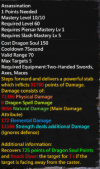
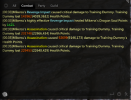
Well this is an old issues since god skills came out not really expecting this to be fixed just putting it out there. Just wondering if its possible to finnally fix the guardian skill assassination. Its suppose to Regen Soul points on hit and never worked as intended since 102 cap SOE acknowledged the issue but kind of just swept under the rug and moved on just wondering if ts possible here.
no worries if its not lol
no worries if its not lol
Attachments
Recruiting German new Guild DragonsofHope
- Guild Recruitment
- 2 Replies
Willkommen mutige Abenteurer und Drachenreiter,
Wir wollen unsere Gilde wieder eröffnen und suchen Mitglieder, die Lust haben mit uns Abenteuer zu erleben wollen, mit uns zusammen wachsen wollen und mit uns gemeinsam stark werden wollen.
Uns ist wichtig, dass ihr Spaß am Spiel habt.
Ohne Pflichten.
Eure Drachen der Hoffnung suchen euch.
Wir wollen unsere Gilde wieder eröffnen und suchen Mitglieder, die Lust haben mit uns Abenteuer zu erleben wollen, mit uns zusammen wachsen wollen und mit uns gemeinsam stark werden wollen.
Uns ist wichtig, dass ihr Spaß am Spiel habt.
Ohne Pflichten.
Eure Drachen der Hoffnung suchen euch.
-
Locked
-
Suggestion
Suggestion Rejected mm account shared bank box

- Suggestions (Archive)
- 1 Replies
is that possible?
-
Suggestion
Suggestion Planned Logistics Merchants on Islands

- By THARGOR
- Suggestions
- 7 Replies
Hey,
is there any chance to activate the Logistics Merchants on Islands in near future?
This would help a lot to do more crafting
is there any chance to activate the Logistics Merchants on Islands in near future?
This would help a lot to do more crafting
Joining I am looking for a friendly guild
- By AriWolf
- Guild Recruitment
- 0 Replies
Hi all.
I used to play a lot with the game while it was a savage hunt, but there were a bit few players so I stopped playing it a bit bad alone.
I hope I find really friendly players and a good clan here who I enjoy playing with
I used to play a lot with the game while it was a savage hunt, but there were a bit few players so I stopped playing it a bit bad alone.
I hope I find really friendly players and a good clan here who I enjoy playing with
Legal Scripts and Macros
- By log163
- General Discussion
- 7 Replies
Not Sure if this is a good place for this thread, but i thought a place for players to post scripts/macros to share would be nice. this first post will be including a rundown on AutoIt and 1 scripts made in AutoIt
Download Link:
you will be able to copy and paste the text for the scripts in a new '.txt' file and rename it so the extension is '.au3'
or create a new AutoIt v3 script from your context menu after installing the program
inside the instalation folder is a '.exe' called 'Au3Info.exe' which you can use to readjust the mouse coordinates if yours don't match with mine
Code:
https://www.autoitscript.com/site/autoit/downloads/or create a new AutoIt v3 script from your context menu after installing the program
inside the instalation folder is a '.exe' called 'Au3Info.exe' which you can use to readjust the mouse coordinates if yours don't match with mine
Please Note: this script tests for a window that has a title that starts with: "Dragon", so if your title is in a different language you may need to adjust it in the code, and then maximizes it (DP may need to be in windowed mode)
Code:
#cs ----------------------------------------------------------------------------

 AutoIt Version: 3.3.14.5
 Author:         log163

 Script Function:
    Use a specific powder a specific number of times on an egg

#ce ----------------------------------------------------------------------------

; Script Start - Add your code below here
#include <MsgBoxConstants.au3>
#include <AutoItConstants.au3>
#include <Constants.au3>
#include <GUIConstantsEx.au3>
#include <UpDownConstants.au3>
Opt("GUIOnEventMode", 1)
   global const $xArray[3] = [393, 440, 490]; the screen x coordinates for the first,second,and third row on powder pane
   global const $xbutton = 442; the screen x coordinates for the confirm button on the powder pane
   global const $yArray[3] = [330, 374, 416]; the screen y coordinates for the first,second,and third column on powder pane
   global const $ybutton = 447; the screen y coordinates for the confirm button on the powder pane
   global const $DragonTitle = "Dragon"; the start of the title for the Dragon's Prohpet window
   global const $mouseSpeed = 5
   global $repeats = 1
   global $powder = 1
_Main()

Func _Main()
    ;Initialize variables
   Local const $iGUIWidth = 300, $iGUIHeight = 100
   global const $windowTitle = "Egg Powderizer"
   Local $idOK_Btn, $idCancel_Btn
   Local $idRepeat, $idPowder


    ;Create window
    GUICreate($windowTitle, $iGUIWidth, $iGUIHeight)

    ;Create an edit box with no text in it
   GUICtrlCreateLabel("Number of Repeats", 10, 10)
   $idRepeat = GUICtrlCreateInput("1", 120, 10, 50, 20)
   GUICtrlCreateUpdown($idRepeat)
   GUICtrlSetOnEvent($idRepeat, "OnUpDown")
   ;GUICtrlSetLimit($idRepeat,0,2)
   GUICtrlCreateLabel("Powder Slot", 10, 40)
   $idPowder = GUICtrlCreateInput("1", 120, 40, 50, 20)
   GUICtrlCreateUpdown($idPowder)
   GUICtrlSetOnEvent($idPowder, "OnUpDown2")
   ;GUICtrlSetLimit($idPowder,1,0)

    ;Create an "OK" button
    $idOK_Btn = GUICtrlCreateButton("Run", 75, 70, 70, 25)
    GUICtrlSetOnEvent($idOK_Btn, "OnYes")

    ;Create a "CANCEL" button
    $idCancel_Btn = GUICtrlCreateButton("Cancel", 165, 70, 70, 25)
    GUICtrlSetOnEvent($idCancel_Btn, "OnExit")
    GUISetOnEvent($GUI_EVENT_CLOSE, "OnExit")

    ;Show window/Make the window visible
    GUISetState(@SW_SHOW)

    While 1
        Sleep(10000)
    WEnd
 EndFunc   ;==>_Main

 ; --------------- Functions ---------------
 Func OnExit()
    Exit
 EndFunc   ;==>OnExit
 Func OnUpDown()
    $repeats = GUICtrlRead (@GUI_CtrlId)
 EndFunc   ;==>OnUpDown
 Func OnUpDown2()
    $powder = GUICtrlRead (@GUI_CtrlId)
 EndFunc   ;==>OnUpDown2
 Func OnYes()
   local $i = 0
   local $x = 0
   local $y = 0
   Switch $powder
            Case 1
               $x = $xArray[0]
               $y = $yArray[0]
            Case 2
               $x = $xArray[1]
               $y = $yArray[0]
            Case 3
               $x = $xArray[2]
               $y = $yArray[0]
            Case 4
               $x = $xArray[0]
               $y = $yArray[1]
            Case 5
               $x = $xArray[1]
               $y = $yArray[1]
            Case 6
               $x = $xArray[2]
               $y = $yArray[1]
            Case 7
               $x = $xArray[0]
               $y = $yArray[2]
            Case 8
               $x = $xArray[1]
               $y = $yArray[2]
            Case 9
               $x = $xArray[2]
               $y = $yArray[2]
            Case Else
               ;$sMsg = "Error"
               Return
         EndSwitch

         If WinExists($DragonTitle) Then
            WinActivate($DragonTitle)
            ;WinWaitActive("Dragon")
            WinSetState($DragonTitle, "", @SW_MAXIMIZE)

            For $i = 1 To $repeats
               MouseClick($MOUSE_CLICK_PRIMARY, $x, $y, 1, $mouseSpeed)
               Sleep(100)
               MouseClick($MOUSE_CLICK_PRIMARY, $xbutton, $ybutton, 1, $mouseSpeed)
               Sleep(100)
            Next
         EndIf
EndFunc   ;==>OnYes
-
Locked
-
Suggestion
Suggestion Implemented Increase Friend List/House Roommate List

- By Dryadia
- Suggestions (Archive)
- 1 Replies
With more ppl coming in from EU...we need more room to add new Friends, and Roommates.
I keep having to delete ppl that may come back...i'd rather keep my old friends AND be able to add new friends.
Please increase the number of friends we can have on friend list, and roommate list.
I keep having to delete ppl that may come back...i'd rather keep my old friends AND be able to add new friends.
Please increase the number of friends we can have on friend list, and roommate list.
-
Locked
30% Dragon's Prophet Diamond Bonus Weekend 6/12-6/14
- By Seiichi
- Announcements & Events
- 3 Replies
We are having another 30% Diamond Bonus weekend starting tonight and ending Sunday at 11:59 PST.
You can purchase Diamonds here.
You can purchase Diamonds here.
-
Locked
-
Suggestion
Suggestion Rejected Dog Star

- By Burak973
- Suggestions (Archive)
- 0 Replies
Dog star 2 It turns out very rarely...
I couldn't find it for 3 days...
Can be more often
I couldn't find it for 3 days...
Can be more often
Attachments


-
Locked
-
Question
Bug Report Solved I can't open the game
- By Linaliee3
- Bug Report (Archive)
- 2 Replies
When I open the launcher and click on "start the game" there is an error message that appears:
"D3DCOMPILER_43.ddl can't be found"
I uninstalled and reinstalled it several times but there is still the same message.
Thanks
"D3DCOMPILER_43.ddl can't be found"
I uninstalled and reinstalled it several times but there is still the same message.
Thanks
-
Locked
-
Question
Bug Report Solved Missing Item

- By DjBlyatman
- Bug Report (Archive)
- 2 Replies
Hello, 15 min ago i bought an Academy Skill Crystal from the Itemshop for 150 Diamonds. I didnt received the Item, but the 150 Diamonds got taken away. So can i get the Item or atleast get the diamonds back?
-
Locked
-
Suggestion
Suggestion Rejected f12 options
- Suggestions (Archive)
- 1 Replies
i would suggest that f12 option could do more then remove evrything. so atleast skillbar still could be seen.
-
Locked
Purchasing Diamonds disabled until Midnight
- By Seiichi
- Announcements & Events
- 0 Replies
To save myself work again, the Diamond shop will be disabled until the sale tonight.
-
Question
Bug Report Solved Teleport under the map in Shrine of Handras
- By Sahlo
- Bug Report (Archive)
- 0 Replies
If you already killed the last boss in Shrine of Handras and then get cought by a tornado you are teleportet to the long corridor. Instead of beeing teleported back to the normal way at the end of the corridor you get teleportet under the map. After waiting a few seconds you die and can revive at the beginning of the dungeon.
Attachments

-
Question
Bug Report port bug from dungeons to island
- By THARGOR
- Bug Reports
- 0 Replies
when you are in a dungeon and want to leave it or leave group, it often happens you get ported to your island - is there something you can do about it to fix it?
i know its a very old bug, but it seems to happen more often here than it did on eu, and even worse - ive been ported to island after i had dc, though i have still been in group and should have been somewhere in the middle of the dungeon.
this is quite annoying when everyone else has to wait for you till you are back in
i know its a very old bug, but it seems to happen more often here than it did on eu, and even worse - ive been ported to island after i had dc, though i have still been in group and should have been somewhere in the middle of the dungeon.
this is quite annoying when everyone else has to wait for you till you are back in
-
Suggestion
Suggestion Selling options / Verkaufsoptionen
- By BeShy
- Suggestions
- 0 Replies
The game offers the possibility to have 21 pages with backpack slots. Of course, many have not yet unlocked the mass of pages, but slowly they are getting more and more. This offers the possibility to actually take the mass of the loot and not have to sell it after 2 minutes of fighting. Nevertheless, the mass of pickable items is large and the sale is limited to the fact that you have to sell each occupied backpack slot separately. It would certainly be a great idea if there was the possibility to sell several items at once. Maybe there is the possibility to implement the option to select items by their rarity. So you could sell all grey, blue, green items with one or two clicks. Maybe a multiple selection would also be possible.
Of course I don't know how good and if this is possible at all, but it would be a great new option.
Das Spiel bietet die Möglichkeit 21 Seiten mit Rucksackslots zu haben. Natürlich haben viele die Masse an Seiten noch nicht freigeschalten, aber nach und nach werden es immer mehr. Dies bietet die Möglichkeit, die Masse des Loots tatsächlich aufzunehmen und nicht nach 2 Minuten Kampf schon verkaufen zu müssen. Dennoch ist die Masse an an aufnehmbaren Items groß und der Verkauf darauf beschränkt, dass man jeden belegten Rucksackslot eigenständig verkaufen muss. Es wäre sicher auch hier eine tolle Idee, wenn es die Möglichkeit gäbe, mehrere Items gleichzeitig zu verkaufen. Vielleicht gibt es die Möglichkeit zu implementieren, dass man nach Seltenheit der Items auswählen kann. So könnte man mit ein bis zwei Klicks alle grauen, blauen, grünen Items verkaufen. Vielleicht wäre auch eine Mehrfachauswahl möglich.
Wie gut und ob das überhaupt umsetzbar ist, weiß ich natürlich nicht, aber es wäre schon eine tolle neue Option.
Of course I don't know how good and if this is possible at all, but it would be a great new option.
Das Spiel bietet die Möglichkeit 21 Seiten mit Rucksackslots zu haben. Natürlich haben viele die Masse an Seiten noch nicht freigeschalten, aber nach und nach werden es immer mehr. Dies bietet die Möglichkeit, die Masse des Loots tatsächlich aufzunehmen und nicht nach 2 Minuten Kampf schon verkaufen zu müssen. Dennoch ist die Masse an an aufnehmbaren Items groß und der Verkauf darauf beschränkt, dass man jeden belegten Rucksackslot eigenständig verkaufen muss. Es wäre sicher auch hier eine tolle Idee, wenn es die Möglichkeit gäbe, mehrere Items gleichzeitig zu verkaufen. Vielleicht gibt es die Möglichkeit zu implementieren, dass man nach Seltenheit der Items auswählen kann. So könnte man mit ein bis zwei Klicks alle grauen, blauen, grünen Items verkaufen. Vielleicht wäre auch eine Mehrfachauswahl möglich.
Wie gut und ob das überhaupt umsetzbar ist, weiß ich natürlich nicht, aber es wäre schon eine tolle neue Option.

The problem with entering the apartments.
- By DrSolitarius
- General Discussion
- 9 Replies
I have a problem entering friends' apartments. I enter the portal and the crystal inside is not active. I go to the portal several times, sometimes four or more so that everything works. Do I have one such problem?
-
Locked
-
Question
Bug Report Solved Asking for a friend... log in problems

- By Jaslyn
- Bug Report (Archive)
- 5 Replies
Good Evening
maybe someone can help my friend who cant log in properly...
he manages to enter the game, hes already in his character-wheel, can choose his char and the loading screen simply wont go over 92%, its stuck there ...
Google couldnt help him and hes forced to end the game at this point.
maybe someone can help my friend who cant log in properly...
he manages to enter the game, hes already in his character-wheel, can choose his char and the loading screen simply wont go over 92%, its stuck there ...
Google couldnt help him and hes forced to end the game at this point.
Load more